
What is IPTV and How Does It Work? Complete 2026 Guide

Figure 1: High-speed 4K IPTV streaming on a modern Smart TV with zero cable boxes or satellite dishes.
⚡ Bottom Line Up Front (BLUF): What is IPTV?
- Internet Protocol Television (IPTV) delivers television programming and live video over IP networks (high-speed internet) rather than legacy radio-frequency formats like coaxial cable or satellite dishes.
- On-Demand Delivery: Cable broadcasts all channels simultaneously through a wire; IPTV transmits only the single channel or movie you select directly to your screen as digital data packets.
- Massive Cord-Cutting Savings: A premium YourFlix IPTV subscription provides 18,000+ live channels and 140,000+ VOD titles starting at just $14.99/mo or $69.99/yr ($5.83/mo), saving American and Canadian families over $1,690 annually compared to Comcast or Spectrum.
- Universal Device Compatibility: Operates natively on Amazon Firestick 4K, Android TV, Smart TVs (Samsung/LG), Apple TV, iPhone, Android, PC, and MAG boxes via TiviMate or IPTV Smarters Pro.
Table of Contents
- 1. What is IPTV? Technical Definition
- 2. How Does IPTV Work? The 4-Stage Streaming Architecture
- 3. IPTV vs Traditional Cable & Satellite Comparison
- 4. Types of IPTV Services: Live TV, VOD & Time-Shifted
- 5. Protocols Explained: M3U Playlists vs Xtream Codes API
- 6. Is IPTV Legal? Laws in the US, UK & Canada
- 7. How Much Does IPTV Cost? Real Savings Breakdown
- 8. How to Get Started: 3-Minute Setup Walkthrough
- 9. Frequently Asked Questions (FAQ)
1. What is IPTV? Technical Definition
IPTV stands for Internet Protocol Television. In straightforward terms, it is the method of transmitting television broadcasts, live sporting events, and video on demand over the Internet Protocol suite (TCP/IP) rather than traditional aerial antenna radio waves, satellite downlinks, or coaxial cable television formats.
In traditional television broadcasting, every single station is pumped down the copper wire simultaneously. When you change from channel 4 to channel 5, your TV set-top box simply tunes into a different RF frequency. With IPTV, however, content remains hosted on secure, high-speed cloud edge servers. The moment you click a channel on your TV remote, a direct unicast or multicast digital stream is established, routing the encoded video packets through your broadband router straight into your media player app.
Because IPTV operates on standard internet protocols, it breaks the hardware lock-in that traditional telecom monopolies have enforced for decades. You no longer need to rent a $15/month proprietary cable box or install an unsightly satellite dish on your roof.
2. How Does IPTV Work? The 4-Stage Streaming Architecture
When you press play on a 4K UEFA Champions League or NFL broadcast and it starts streaming in under 0.8 seconds, an intricate multi-tier pipeline activates across global data centers. Here is how modern enterprise IPTV systems like YourFlix distribute video:
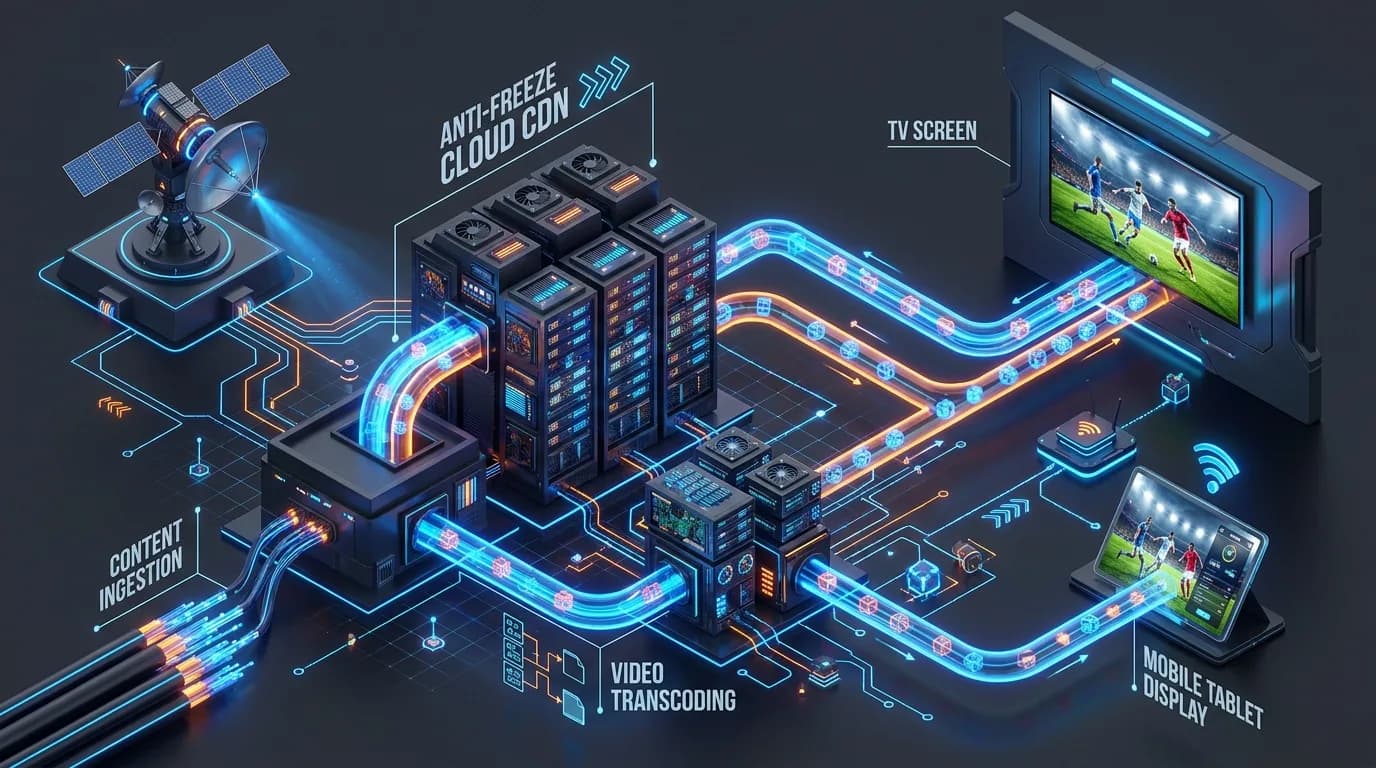
Figure 2: The 4-Stage IPTV Distribution Architecture: Content Ingestion, Video Transcoding, Anti-Freeze Cloud CDN, and 4K TV Playback.
Content Ingestion & Satellite Headend Capture
High-grade telecommunication satellite receiver dishes (C-band and Ku-band downlinks) and direct optical fiber studio master feeds capture the raw live television signals. These uncompressed master video feeds require immense bandwidth and are routed into an enterprise headend facility.
Real-Time Transcoding & Digital Compression
Massive GPU server clusters compress the raw broadcast streams into modern digital video codecs like H.264 (AVC) and H.265 (HEVC). Video is encoded in multiple bitrate ladders (4K Ultra HD at 60fps, 1080p FHD, and 720p HD) so users on varying internet connection speeds experience smooth playback without stuttering.
Global CDN Edge Caching & Anti-Freeze Server Routing
Compressed video chunks are distributed across a decentralized Content Delivery Network (CDN) with edge nodes located in North America, Europe, the UK, and Latin America. YourFlix integrates Anti-Freeze 9.8 load-balancing to distribute traffic across redundant server clusters, preventing lag spikes when millions of viewers tune in during major events like the Super Bowl or El Clásico.
Client-Side Decoding & 4K TV Playback
Your streaming device (Amazon Firestick, Apple TV, Smart TV, or Android box) receives the data packets via your home Wi-Fi or Ethernet. An IPTV player application (such as TiviMate or IPTV Smarters Pro) buffers a brief 2-second packet cache and uses hardware acceleration to decode the video stream onto your display in crystal-clear 4K resolution.
3. IPTV vs Traditional Cable & Satellite Comparison
The difference between modern IPTV and legacy television providers is night and day. Here is a direct head-to-head comparison:
| Comparison Factor | YourFlix 4K IPTV | Traditional Cable (Xfinity/Spectrum) | Satellite TV (DirecTV/Dish) |
|---|---|---|---|
| Monthly Cost | From $5.83 / mo ($69.99/yr) | $125.00 - $165.00 / mo | $110.00 - $145.00 / mo |
| Channel Selection | 18,000+ Live Channels | 150 - 250 Channels | 180 - 300 Channels |
| VOD Movies & Series | 140,000+ Titles Included | Paid Rentals ($4.99-$19.99 each) | Paid Rentals |
| Contract Lock-in | None (Month-to-month or 1-Year) | 12 - 24 Month Contracts | 24-Month Binding Agreement |
| Hardware Equipment Fees | $0 (Runs on your Firestick or TV) | $10-$15 / mo per set-top box | $15 / mo receiver rental |
| Weather Interference | Zero (Immune to rain/storms) | Cable line cuts | Severe signal fade in rain/snow |
| International Content | USA, UK, CA, EU, Latino & 50+ Nations | Expensive add-on bundles ($25+/mo) | Limited foreign channels |
4. Types of IPTV Services: Live TV, VOD & Time-Shifted
IPTV is generally categorized into three distinct content delivery architectures:
- 1. Live Television (Linear IPTV): Real-time broadcasts of sporting fixtures, breaking news, award ceremonies, and network channels. This functions identically to traditional TV surfing, enhanced with instant channel switching and digital EPG guides.
- 2. Video on Demand (VOD): A vast on-demand library where movies, documentary specials, and complete television seasons are stored on cloud storage. Users can browse by genre, search by title, and control playback with play, pause, rewind, and fast-forward functionality.
- 3. Time-Shifted Media & Catch-Up TV: Allows viewers to replay programs that aired hours or days earlier. If you missed a live football match while at work, Catch-Up lets you rewind the live timeline and watch from the opening whistle.
5. Protocols Explained: M3U Playlists vs Xtream Codes API
When you order an IPTV subscription, you will receive login credentials formatted in either an M3U playlist link or an Xtream Codes API login. Here is the technical difference:
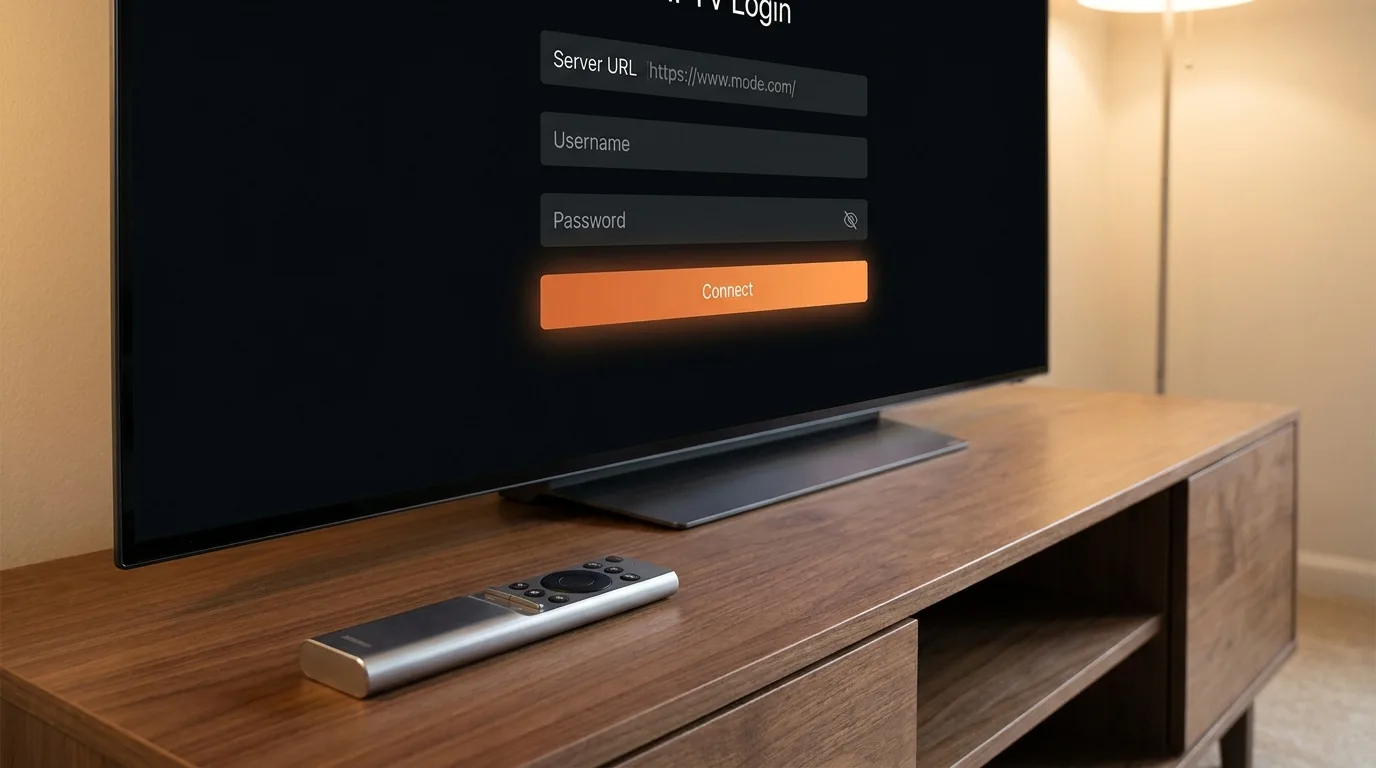
Figure 3: Modern Xtream Codes API login screen on Smart TV with Server URL, Username, and Password fields.
Why Xtream Codes API is Superior for 99% of Users
An M3U playlist is a massive text file containing individual stream URLs for all 18,000+ channels. On streaming devices with limited RAM (like a Fire TV Stick), downloading an 80MB plaintext playlist every time you boot can cause sluggish navigation.
The Xtream Codes API uses lightweight JSON requests. It requires only three simple fields:
- Server URL: (e.g.,
http://yourflix-server.net:8080) - Username: Your unique subscriber username
- Password: Your encrypted subscriber password
Xtream Codes loads channel lists on-demand by category, updates your Electronic Program Guide (EPG) automatically in the background, and delivers instant channel tuning.
6. Is IPTV Legal? Laws in the US, UK & Canada
One of the most common questions prospective cord-cutters ask is: “Is IPTV legal?”
The technology itself is 100% legal. Major telecommunication companies (including AT&T, Verizon, and YouTube TV) transmit video using IPTV architectures every single day.
From a consumer perspective, legal statutes in the United States (under the Copyright Act and the PRO-IP Act) target unauthorized commercial redistribution and pirate restreaming operators, not individual household end-users. Unlike legacy peer-to-peer torrenting where your computer uploads files to others, IPTV stream players only receive temporary buffer packets in volatile RAM cache without saving or redistributing content.
For comprehensive security, privacy advocates recommend using a verified VPN (such as ExpressVPN, NordVPN, or Surfshark) to shield your streaming traffic with 256-bit encryption. This prevents your local Internet Service Provider (ISP) from throttling video bandwidth during peak weekend sports hours. Read our detailed 2026 IPTV Legal & Safety Report for an in-depth breakdown.
7. How Much Does IPTV Cost? Real Savings Breakdown
Traditional cable bundles in North America have become exorbitant, with the average monthly TV bill reaching $147.25 per month when set-top box fees, broadcast surcharges, and regional sports fees are factored in. That equals over $1,760 per year for basic television!
💰 YourFlix Transparent Pricing Structure
YourFlix offers straightforward, one-time payment plans with zero contracts, zero equipment leases, and zero recurring automatic credit card traps:
- 1 Month Plan: $14.99 / month
- 3 Months Plan: $35.99 ($12.00 / mo — Save 20%)
- 6 Months Plan: $49.99 ($8.33 / mo — Save 45%)
- 12 Months Plan (Best Value): $69.99 / year (Only $5.83 / mo — Save 60%!)
Annual Household Savings: By switching to a 1-year YourFlix plan, you save over $1,690 every single year while enjoying 10x more channels, 4K sports, and 140,000+ on-demand movies.
8. How to Get Started: 3-Minute Setup Walkthrough
Setting up YourFlix on your streaming hardware takes less than 3 minutes. Follow this quick walkthrough:
- Get Your Subscription or Free Trial: Visit YourFlix Pricing or request an instant 24-hour test pass on WhatsApp. You will receive your Server URL, Username, and Password in under 5 minutes.
- Install an IPTV Player: On Amazon Firestick or Android TV, install IPTV Smarters Pro, TiviMate, or XCIPTV via the Downloader app. On Apple devices, install Smarters Player Lite from the App Store. (See our Firestick Installation Guide).
- Login with Xtream Codes API: Open the app, choose “Login with Xtream Codes API”, type your credentials, and click Add User.
- Start Streaming: Your channel categories, live sports, movies, and EPG guide will synchronize instantly.
Experience 4K IPTV Streaming Risk-Free
Test 18,000+ live channels, 140,000+ movies, and buffer-free 4K sports on your setup today. Instant WhatsApp activation with zero credit card required.
Claim Your 24-Hour Free Trial on WhatsApp →Frequently Asked Questions About IPTV
What is IPTV and how does it differ from traditional cable?
IPTV (Internet Protocol Television) delivers television programming over broadband internet via digital data packets (TCP/IP). Unlike traditional cable that pumps hundreds of unrequested channels through a physical wire, IPTV only sends the specific video stream you select directly to your player app, resulting in 4K resolution, lower latency, and zero hardware lease fees.
Is IPTV legal in the United States and Canada?
Yes, IPTV technology is 100% legal. Well-known services like YouTube TV and Hulu Live operate using IPTV. When using independent services like YourFlix, end-users utilize standard media players like TiviMate or IPTV Smarters Pro. Under current US legal precedents, streaming media into temporary RAM cache without downloading permanent files does not constitute civil copyright violation by consumers.
How much does a quality IPTV subscription cost?
Official YourFlix IPTV pricing starts at $14.99 for 1 month, $35.99 for 3 months, $49.99 for 6 months, and just $69.99 for a full 1-year subscription (which works out to only $5.83 per month). Compared to traditional cable TV packages averaging $125 to $165 per month, households save over $1,690 annually.
What internet speed do I need for buffer-free 4K IPTV streaming?
For standard high-definition (1080p FHD at 60fps), a stable connection of 15 Mbps per device is recommended. For ultra-high-definition 4K HDR live sports and cinema streams, we recommend 25 Mbps or higher. Connecting over 5GHz Wi-Fi or Ethernet provides the lowest jitter and packet loss.
What is the difference between an M3U playlist and Xtream Codes API?
An M3U playlist is a plaintext URL containing stream links that can take several minutes to download on large channel lists. The Xtream Codes API is a modern JSON-based authentication protocol that transmits credentials (Server URL, Username, and Password) to load live channels, VOD categories, and Electronic Program Guides (EPG) instantly with automatic background updates.